My Role
Executive summary
When Intuit was shifting to a Business Suite model, the assumption was that mobile would mirror web. No one had tested it or asked if it made sense. We challenged that assumption. I built a case for a different direction and defined a vision for the mobile experience. The result was a new architecture, headcount to build it, and a concept that became QuickBooks' next major AI initiative.
Project background: the Business Suite shift
Intuit is evolving from standalone products, QuickBooks, Mailchimp, TurboTax, into a connected Business Suite, shifting the business model toward modular adoption, cross-product engagement, and higher lifetime value. On web, the team had a strategy around a platform with many apps, and launched an alpha. Users log into a central platform experience and navigate out to distinct apps like Accounting or Customers.
Mobile had no equivalent direction. My team was tasked with defining what the mobile experience of this Business Suite should be. Leadership was leaning toward following the web structure, since cross-platform consistency is a common industry pattern. But we believed mobile needed its own approach. Users have different mindsets and behave differently on mobile, and the platform itself has different capabilities.
The problem statement
- How should the Business Suite strategy adapt for mobile, given its platform constraints and user behaviors?
- Where could mobile deliver unique value that web fundamentally cannot?
I framed the problem this way so it opened us to the possibilities of mobile, rather than treating web parity as the starting point.
Aligning the team through a workshop
Our team knew web parity wasn't the right call, but we didn't have the shared language to explain why. I designed a multi-day workshop to solve that. I structured it so we had shared context before we generated solutions: we reviewed the web strategy together, mapped the full user journey, and established design principles as a group. Then we surfaced opportunities, wrote how-might-we statements, brainstormed ideas, and storyboarded the strongest concepts.
I walked away with a decision on mobile strategy and a set of ideas to build a vision around.
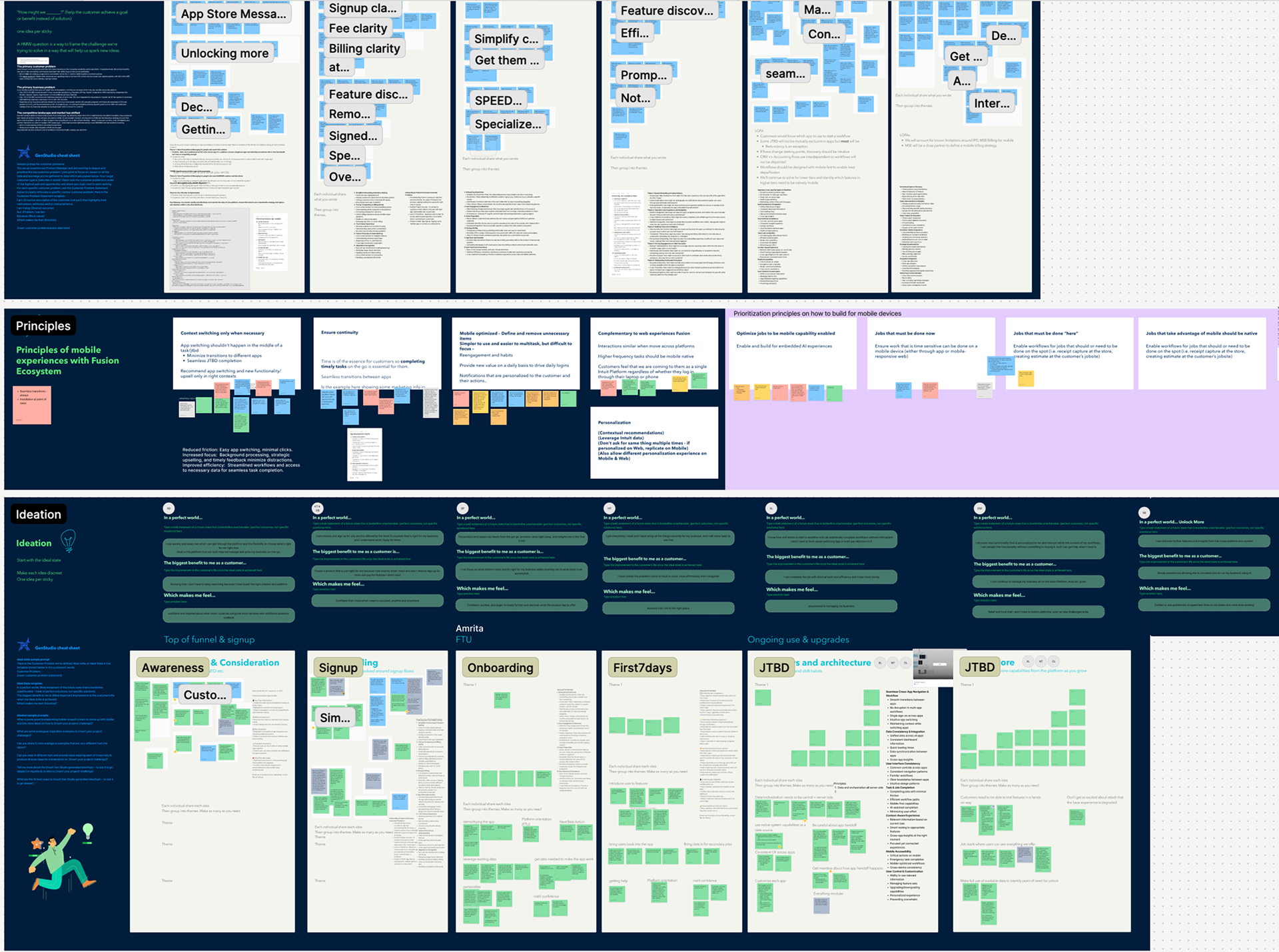
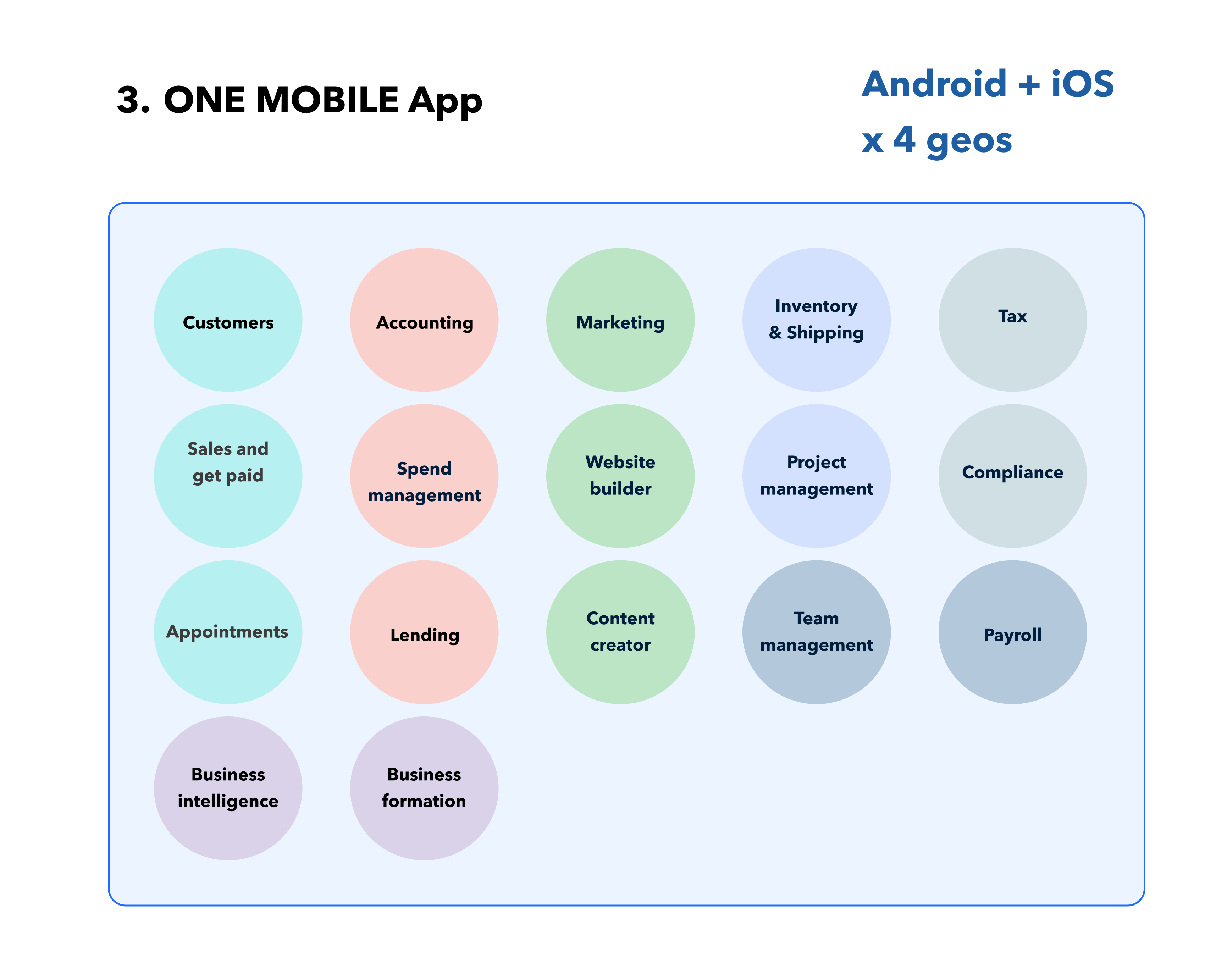
Three models came out of the workshop:
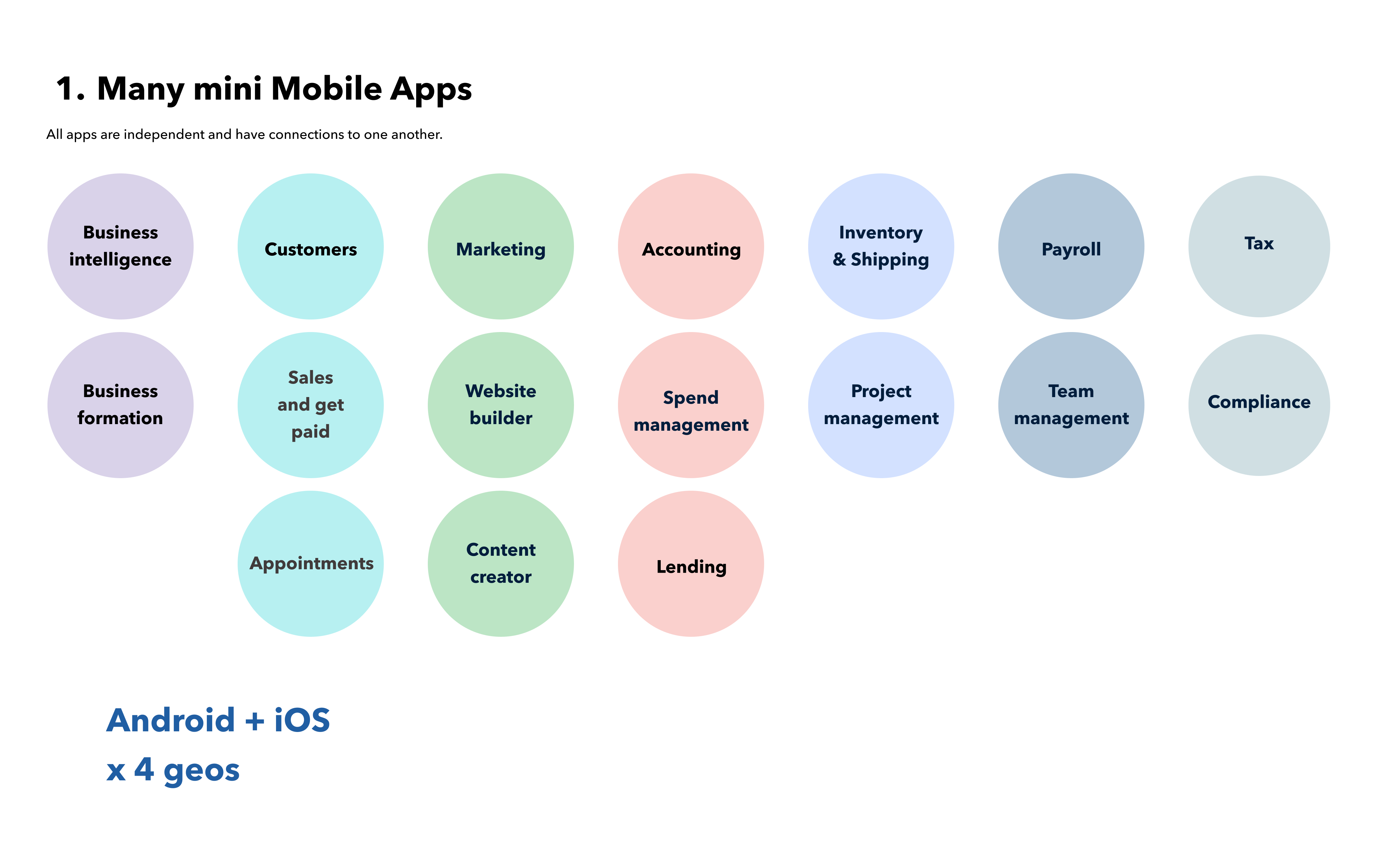
Many Apps
One app per product, mirroring the web. Users would download and switch between multiple separate apps to run their business. Fragmented workflows, high user friction, and substantial design and engineering overhead.
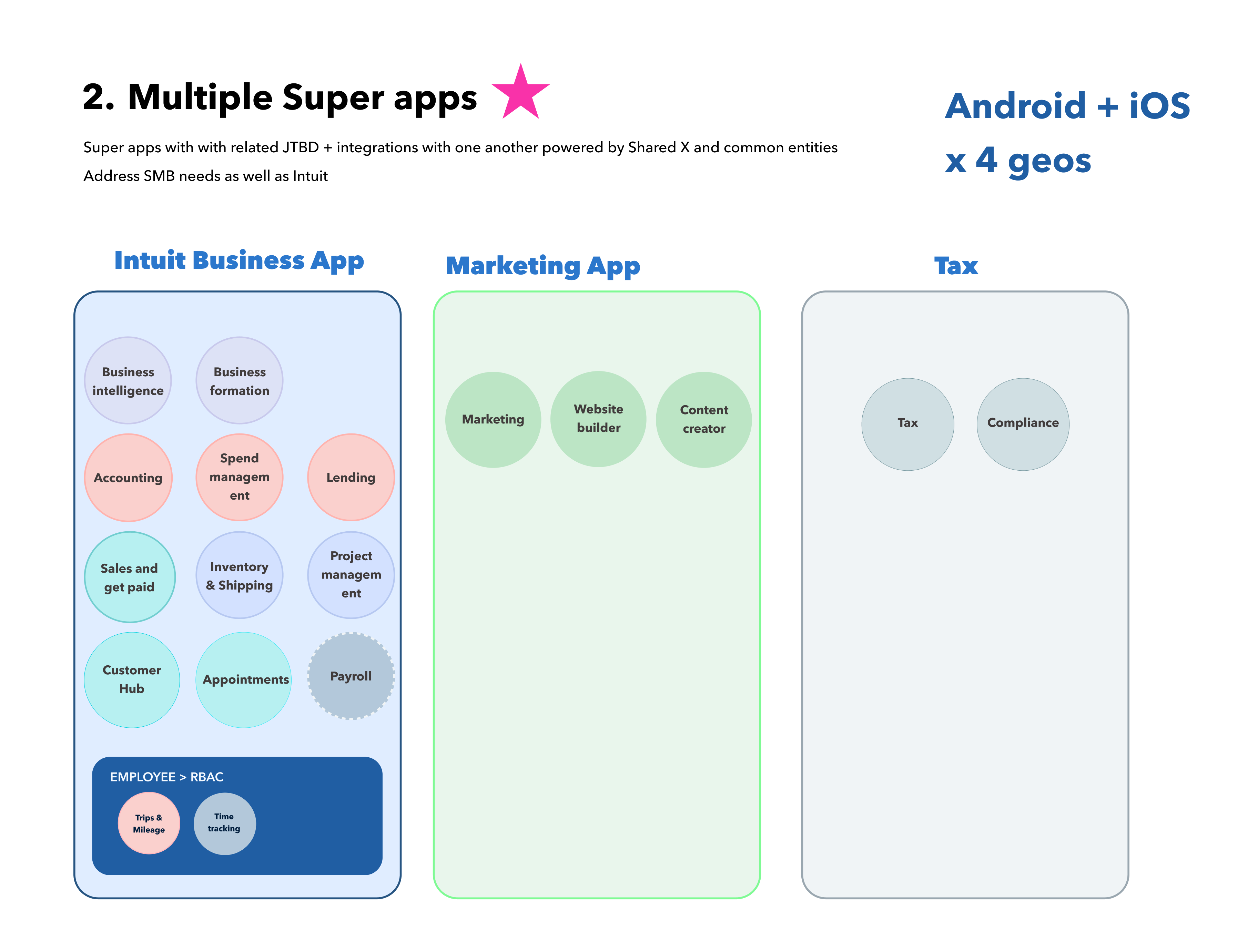
Three Super Apps
Grouped by business domain and job-to-be-done. Users complete end-to-end workflows without interruption. Feasible within a 12-month horizon.
One Unified App
A single destination for everything. Compelling long-term but has performance and execution risks.
The decision
Our team aligned on the Three Super Apps because it minimized friction, delivered cross-product value, and was executable.
Getting leadership on board
Aligning our own team was the easier half. Getting leadership and the web team on board was harder.
Cross-platform consistency is a common industry pattern, and the web team had already shipped an alpha. Instead of debating the principle, I made the cost of it visible.
I built workflow diagrams showing tasks like interacting with a lead, converting them to a customer, getting paid. In the many-apps model, users had to download multiple apps and switch between them to complete a single flow. In the Super Apps model, the same tasks happened without interruption.
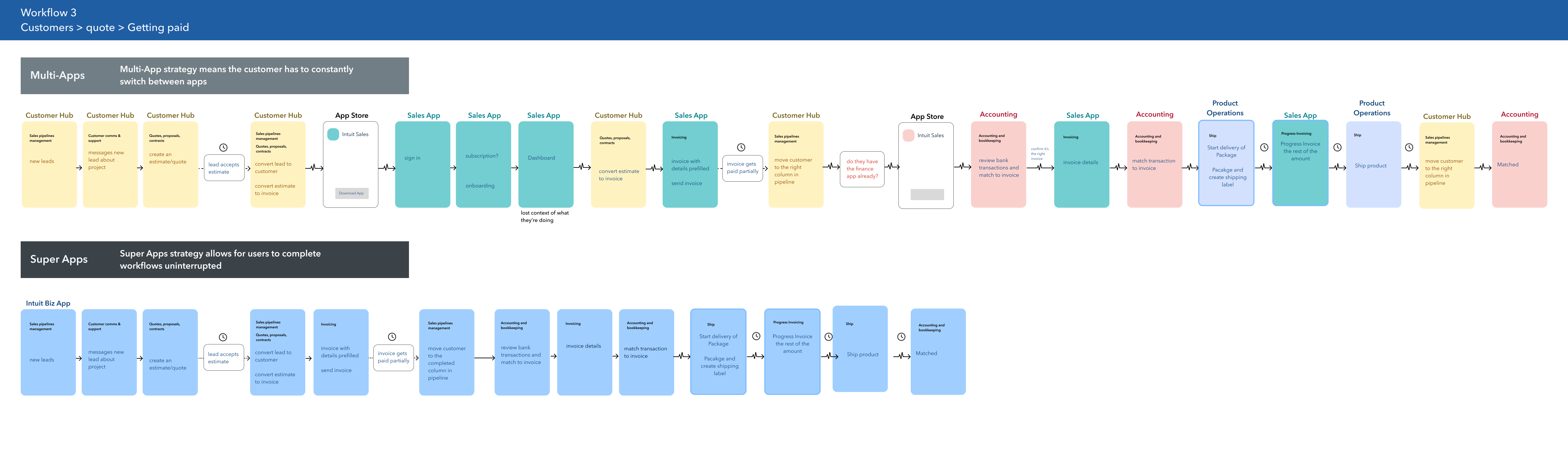
The diagrams made the user friction obvious. Leadership and the web team aligned on the Three Super Apps approach.
The vision: three focus areas of the experience
With the architecture settled, I focused on the experience vision. Mobile shouldn't just be a smaller version of web. It needs to lean into what makes mobile different.
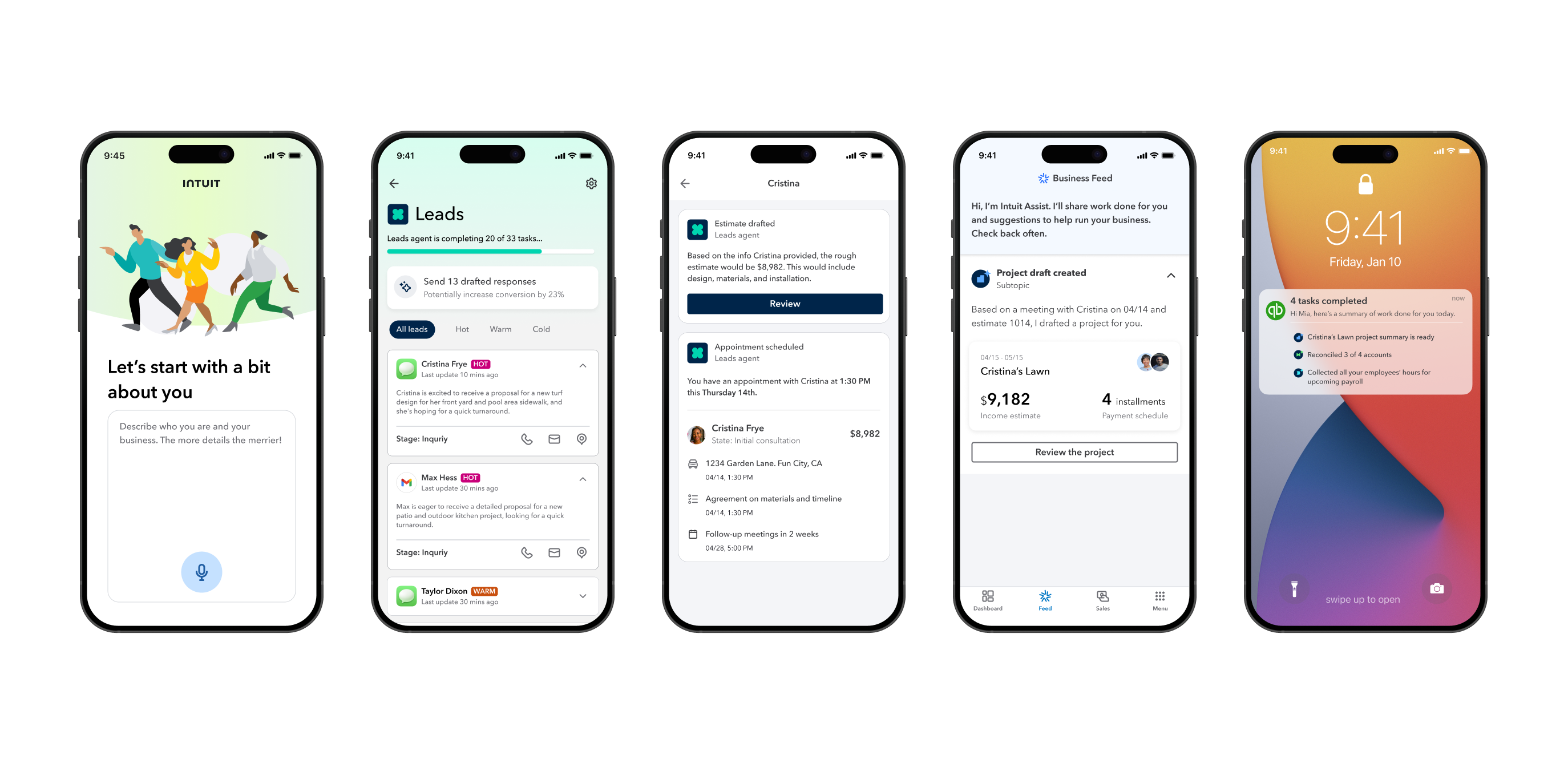
I framed the vision as a system with three focus areas, each addressing a different phase of the customer journey: getting into QuickBooks, using QuickBooks, and growing through QuickBooks. I built prototype screens around Mia, a landscaping business owner, to show how each focus area would work across her day.
To make the strategy tangible, I built a narrative around Mia, a landscaping business owner, and showed how the focus areas connect across her business journey.
Mobile-native capabilities
Leverage hardware and platform to simplify workflows in ways web cannot. Drives acquisition and reduces onboarding friction.
Agentic AI experiences
AI agents handle administrative work proactively, saving time and deepening product engagement over time.
Contextual growth pathways
Growth opportunities embedded in workflows rather than layered on top, encouraging expansion naturally.
1. Mobile-native capabilities
Mobile should lean into what differentiates it from web. Mobile hardware and platform capabilities make it possible to simplify workflows in ways web cannot. For the vision presentation, I mocked up multiple ideas:
- iOS App Clips to try features before downloading
- Voice-led onboarding to cut setup friction and reduce manual data entry
- Siri-based business queries for hands-free updates while in the field
- Tap to Pay to collect payments on site
Deep dive: App Clips as an acquisition engine
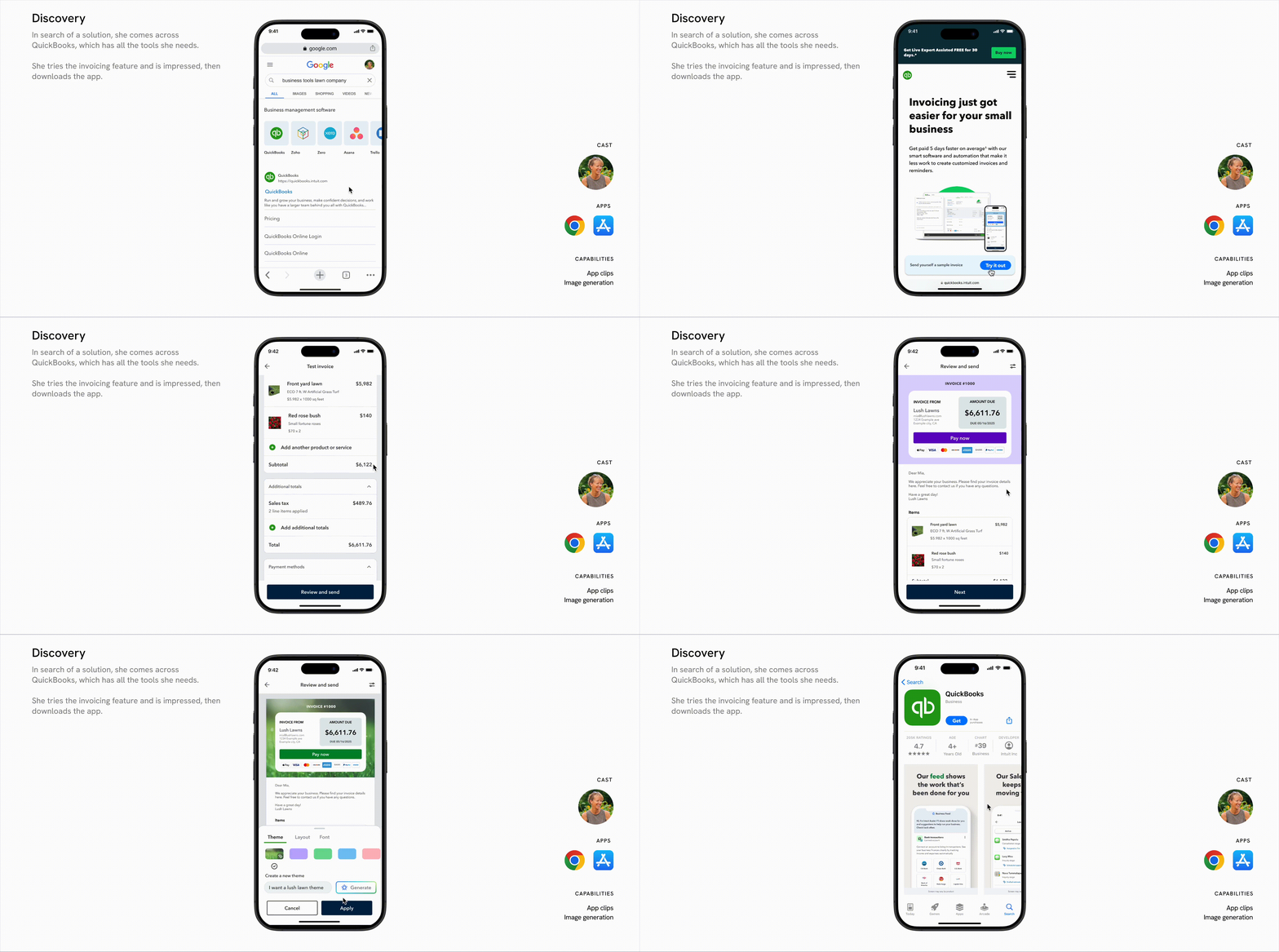
One barrier to mobile acquisition is that people don't know how QuickBooks will help them. To address this, I designed a top-of-funnel flow that demonstrated value immediately. When Mia discovers QuickBooks through a Google search, she is able to try the invoicing feature via App Clip. She can customize and send a sample invoice to herself before ever downloading the full app.
This shows how mobile could support acquisition by demonstrating value before committing to a download.
2. Agentic AI experiences
Small business owners are constantly juggling administrative overhead. I envisioned a future where AI agents work proactively in the background to save people time and effort.
- Customers Agent surfaces leads, drafts estimates, and supports conversion
- Projects Agent creates projects from client interactions, drafts invoices, schedules payments, and tracks progress
- Accounting Agent reconciles transactions and handles bookkeeping
Deep dive: the Projects Agent
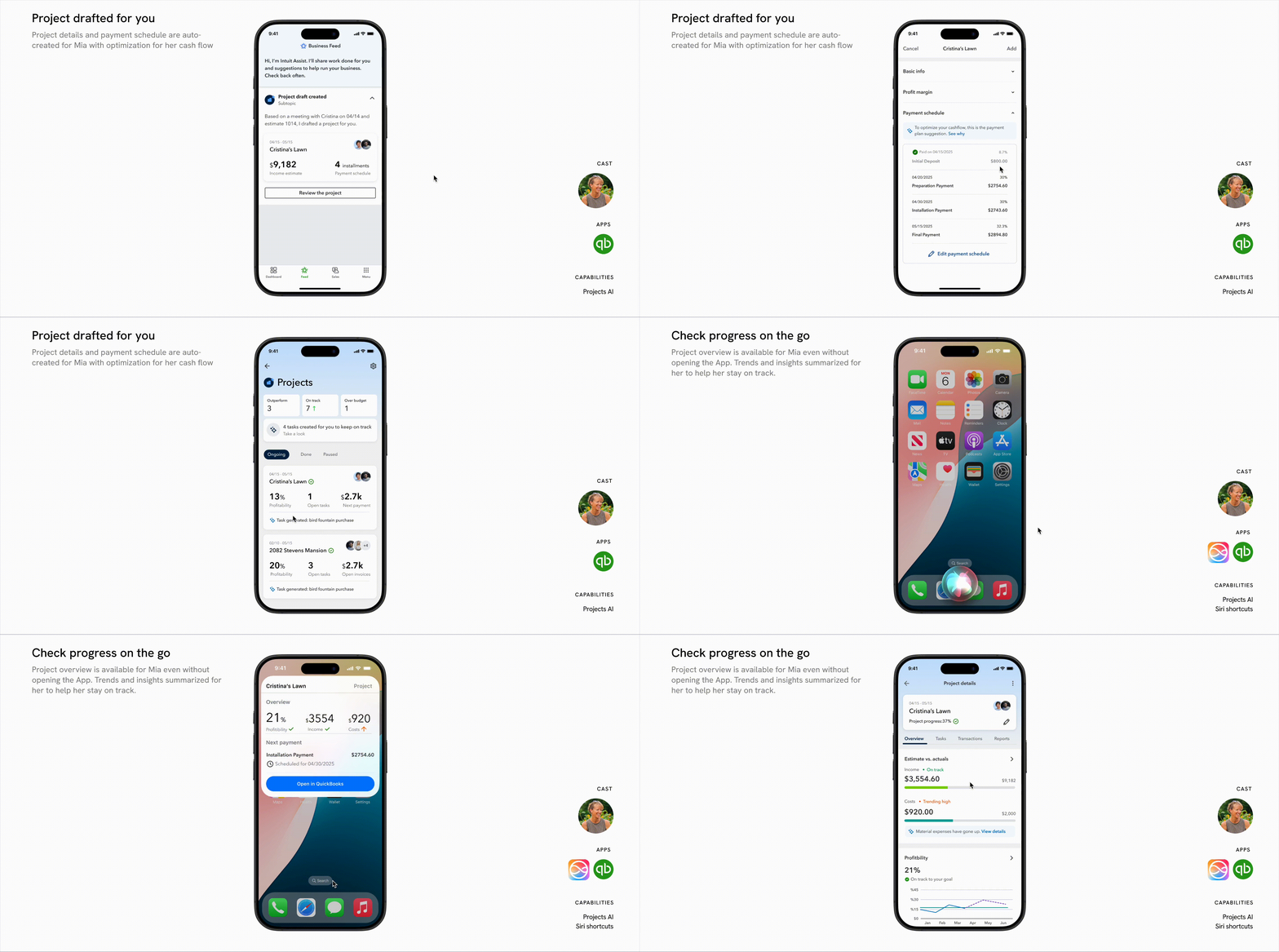
The Projects Agent proactively creates projects based on Mia's client interactions, drafts invoices, and manages payment schedules. Mia can check financial progress using Siri while away from her desk.
This illustrated how AI agents save small business owners time, reduce cognitive load, and increase product stickiness by staying embedded in daily workflows.
3. Contextual growth pathways
To support modular adoption and cross-product engagement, I designed growth into the workflows rather than layering it on top.
- Upgrade prompts that appear only after successful task completion
- Behavioral recommendations based on recent activity
- In-context trials of higher-tier features so users experience value before being asked to pay for it
Together, they work as a system: native capabilities drive adoption, agentic AI deepens engagement, and contextual growth creates expansion without interrupting the experience.
What the strategy unlocked
The project repositioned mobile from a companion app to a growth driver.
20+ engineers and 2 designers committed to execute the strategy.
Customer Agent became QuickBooks' next major AI initiative, with a dedicated team formed to build it.
Voice Onboarding and App Clips were added to the roadmap with engineering resources allocated to explore both.
From vision to execution
After the presentation, work began on the vision. A Customers Agent team formed to design that experience. On the mobile team, I worked with two other designers to redesign the bottom navigation and main menu for the new Super Apps architecture. I explored what in-context upgrade prompts could look like, and worked with my engineering partners to explore AI-driven onboarding, including importing business data from a user's website and using App Clips to let people try QuickBooks before downloading it.
What I learned
Design principles are good guidelines. But sometimes the work is recognizing when a principle doesn't serve your users, and having the conviction to make that case.
This project also taught me to tailor my message to my audience. Leadership doesn't care about interaction details; they care about how QuickBooks mobile and AI can improve Mia's life and help her run her business. Framing the work that way is what won leadership over.